 ‧ Agnes Kazaryan ‧
March 07, 2026
‧ Agnes Kazaryan ‧
March 07, 2026  1460 ‧
 0
0
Finding the right writing app can feel overwhelming. There are dozens of options, and they all claim to make you a better, faster, more productive writer. Some of them actually deliver. Most of them are just noise.
This guide cuts through that. We looked at the most popular writing tools available in 2026 – free and paid, simple and advanced – and broke down exactly who each one is for, what it does well, and where it falls short.
Quick answer: The best writing apps in 2026 are Google Docs (free, collaborative), Microsoft Word (professional formatting), Scrivener (long-form and fiction), Grammarly (AI-powered editing), Hemingway Editor (clarity and readability), Ulysses (distraction-free for Mac), and Evernote (research and note organization). The right one depends entirely on what and how you write.
Whether you’re drafting blog posts, finishing a novel, polishing a business report, or just trying to keep your ideas organized, there’s a writing tool built for exactly that. Here’s how to find yours.
What are writing apps and why do they matter in 2026?
A writing app is any software designed to help you draft, edit, organize, or publish written content. That covers everything from basic word processors like Google Docs to specialized long-form tools like Scrivener to AI-assisted editors like Grammarly.
In 2026, the category has expanded significantly. AI features are now baked into most major writing tools – grammar suggestions, tone adjustments, sentence rewrites, even full paragraph generation. That raises the bar for what a good writing app should do and makes choosing the right one more important than ever.
The best writing apps don’t just give you a blank page. They help you think more clearly, write more efficiently, and produce work you’re actually proud of. That’s true whether you’re a student, a content creator, a novelist, or a small business owner writing your own copy.
How do the best writing apps compare?
Before diving into each tool, here’s a quick overview of the top writing apps, the effort required to learn them, and what kind of writer they suit best.
Each of these writing tools has a clear use case. The mistake most people make is picking the most feature-rich option rather than the one that actually fits their workflow. More on that below.
The best writing apps reviewed
Here’s a closer look at each of the top writing apps available in 2026 – what they do, who they’re for, and what to watch out for.
Google Docs
Google Docs is the most widely used writing app in the world, and for good reason. It’s free, it runs in your browser, and it saves everything automatically to the cloud. You can share a document with anyone and edit it together in real time – no emailing files back and forth, no version confusion.
For everyday writing, team collaboration, and quick drafts, it’s hard to beat. The interface is clean and familiar, the learning curve is almost zero, and it works on every device.
Important note: Google Docs requires an internet connection for full functionality. The offline mode works, but it’s limited – don’t rely on it as your primary setup if you write in low-connectivity environments regularly.
In 2026, Google has added AI writing suggestions and smart editing features through Gemini integration, which puts it more on par with premium tools for everyday users.
Best for: Students, remote teams, bloggers, and anyone who needs free, reliable, collaborative writing software.
Microsoft Word
Microsoft Word is the industry standard for professional and academic documents. It’s been around for decades and still leads when it comes to formatting depth, template variety, and compatibility with workplace systems.
If you’re submitting manuscripts, writing academic papers, or producing business reports, Word is almost certainly what your institution or client expects. Its Track Changes feature remains the gold standard for editorial collaboration.
The downside is cost – Word requires a Microsoft 365 subscription, which runs around $70–$100/year depending on your plan. It can also feel overwhelming for writers who just want a clean page and nothing else.
Best for: Professionals, academics, corporate users, and anyone submitting documents in formal contexts.
Scrivener
Scrivener is the go-to writing app for long-form projects – novels, screenplays, dissertations, and research-heavy writing. It’s built around the idea that writing a book isn’t like writing a document. You need to move sections around, keep research accessible, and see your structure at a glance.
Scrivener’s corkboard view, outline mode, and binder system let you work on individual scenes or chapters without losing sight of the whole project. It also stores your research – images, notes, PDFs, web links – right alongside your manuscript.
The learning curve is real. Scrivener takes time to set up and get comfortable with. But most serious authors who switch to it never go back.
Important: Scrivener is a one-time purchase (around $59 for desktop), not a subscription. That makes it unusually good value for a writing tool of this depth.
Best for: Novelists, screenwriters, academics, and anyone working on a large, complex writing project.
Grammarly
Grammarly is less a writing app and more an AI-powered editing layer that sits on top of everything else. It works as a browser extension, a desktop app, and a standalone editor – so it can check your writing wherever you are, whether that’s in Google Docs, Gmail, or a WordPress post.
The free version handles spelling and basic grammar. The premium version adds style suggestions, tone detection, clarity improvements, and plagiarism checking. In 2026, Grammarly’s AI rewrites have become genuinely useful rather than generic, which makes the premium plan easier to justify.
Important note: Grammarly doesn’t always get context right. It can flag intentional stylistic choices as errors. Treat it as a second opinion, not a final authority.
Best for: Bloggers, business writers, students, and non-native English speakers who want consistent, polished output.
Hemingway Editor
Hemingway Editor is a focused writing tool with one goal: making your writing clearer and more readable. It color-codes your text to highlight long sentences, passive voice, unnecessary adverbs, and overly complex phrasing. The idea is to push you toward tighter, more direct writing – in the style of, well, Hemingway.
It’s not a full word processor. You won’t use it to draft an entire novel or manage a research project. But as a revision tool for blog posts, landing pages, emails, and short-form content, it’s extremely effective.
The web version is free. The desktop app costs a one-time fee of around $19.99.
Best for: Content creators, bloggers, copywriters, and anyone who wants to tighten up their writing quickly.
Ulysses
Ulysses is a distraction-free writing app built exclusively for Apple devices – Mac, iPhone, and iPad. It uses Markdown for formatting, syncs across devices via iCloud, and keeps your entire writing library in one organized place.
The interface is minimal by design. There are no toolbars cluttering your screen, no menus to click through. You write, and the app stays out of your way. For writers who find standard word processors too noisy, Ulysses is a genuinely calming environment to work in.
It’s subscription-based at around $5.99/month or $39.99/year, which puts some people off. But for Mac-native writers who produce content regularly, the workflow benefits tend to justify the cost.
Important: Ulysses is Apple-only. If you write on Windows or Android, it’s simply not an option.
Best for: Mac users, bloggers, and writers who want a clean, focused environment for long-form writing.
Evernote
Evernote isn’t strictly a writing app – it’s a note-taking and organization tool. But for writers who need to capture ideas, organize research, clip web pages, and keep everything in one searchable place before they start writing, it’s invaluable.
You can store text notes, images, audio recordings, PDFs, and web clips, all tagged and searchable. The cross-device sync means your research is always with you.
The free plan is limited in storage and features. The paid plans start at around $14.99/month, which feels steep for what is essentially a note organizer. Many writers use Evernote for research and a separate tool like Google Docs or Ulysses for the actual writing.
Best for: Writers who need to organize large amounts of research, notes, and ideas before drafting.
What makes a good writing app – the features that actually matter
Most writing app reviews list every feature the tool has. That’s not very helpful if you’re trying to make a quick decision. Here are the features that actually make a difference in daily use.
Distraction-free mode
A clean writing environment matters more than most people admit. If your tool is cluttered with menus, notifications, and formatting options you don’t need, it actively gets in the way of thinking. The best writing apps either have a dedicated focus mode or are minimal by default.
Cloud sync and cross-device access
Your writing shouldn’t be trapped on one device. Whether you draft on a laptop and edit on your phone, or switch between home and office setups, automatic cloud sync is essential. Google Docs and Ulysses handle this particularly well.
Export and file compatibility
The app you write in shouldn’t lock your work inside its own format. The best writing tools export cleanly to DOCX, PDF, ePub, Markdown, or plain text – whatever your workflow requires downstream.
Collaboration tools
If you write with others – co-authors, editors, clients – real-time collaboration and commenting are non-negotiable. Google Docs leads here. Microsoft Word’s Track Changes is the standard for editorial back-and-forth.
AI and editing assistance
In 2026, AI features are table stakes for most writing software. Grammarly leads on standalone editing. Google Docs and Word both have built-in AI tools. The key is finding AI assistance that improves your writing without overwriting your voice.
Free vs. paid writing apps – is it worth spending money?
For most casual writers, free writing apps are genuinely sufficient. Google Docs covers everyday writing, collaboration, and cloud storage with no cost at all. Hemingway Editor’s web version is free. Grammarly’s free tier catches the most common errors.
Where paid writing tools earn their keep is in depth and specialization. Scrivener’s organizational system has no real free equivalent for long-form writing. Grammarly Premium’s AI suggestions go meaningfully beyond what the free version offers. Ulysses’ distraction-free environment and iCloud sync are worth the subscription for writers who use it daily.
A reasonable rule of thumb: start free, identify the specific limitation that’s slowing you down, then pay to solve that specific problem. Don’t buy the most expensive writing software and hope it makes you a better writer. It won’t.
Important note: Many paid writing apps offer free trials of 7–30 days. Use them. A writing tool that doesn’t fit your workflow is useless regardless of price.
Tips for getting the most out of any writing app
The best writing app is the one you actually use consistently. A few habits make a big difference regardless of which tool you choose.
Turn on auto-save and cloud backup immediately. Losing a draft because of a crash or a closed tab is a completely avoidable frustration. Every major writing tool has this – make sure it’s enabled from day one.
Use templates where they exist. Whether it’s a blog post structure in Google Docs, a chapter template in Scrivener, or a business report format in Word, templates save time and reduce the friction of starting a new piece.
Keep your writing app updated. Feature updates, AI improvements, and security patches all come through regular updates. An outdated version of your writing software is a slower, less capable version.
Don’t switch tools too often. It’s tempting to keep trying new writing apps, but constantly changing your setup interrupts your workflow and wastes time on learning curves. Pick a tool, commit to it for at least 30 days, and evaluate from there.
How to choose the right writing app for your situation
The right writing software depends almost entirely on what you’re writing, how you work, and what devices you use. Here’s a quick guide by writer type.
Complete beginner: Start with Google Docs. It’s free, requires zero setup, works on every device, and covers everything you need to get words on a page. Add Grammarly’s free browser extension for basic editing support.
Intermediate / part-time writer: If you’re producing content regularly – blog posts, articles, essays – consider adding Hemingway Editor for revision and upgrading to Grammarly Premium if editing quality matters to your output. If you’re on a Mac and value a clean writing environment, Ulysses is worth a trial.
Advanced / long-form or professional writer: If you’re writing a book, screenplay, or dissertation, invest the time in Scrivener. The learning curve is real but the organizational depth is unmatched. Pair it with Grammarly for final editing passes. Microsoft Word remains essential if you’re submitting work to publishers, academic institutions, or corporate clients.
AliDropship: Your complete all-in-one solution for starting dropshipping in 2026
If you want the simplest possible way to start dropshipping – especially if you’re brand new – AliDropship remains one of the most beginner-friendly tools available in 2026. It brings together store creation, product imports, automation, and marketing into a single streamlined system designed to help you launch quickly and grow confidently.
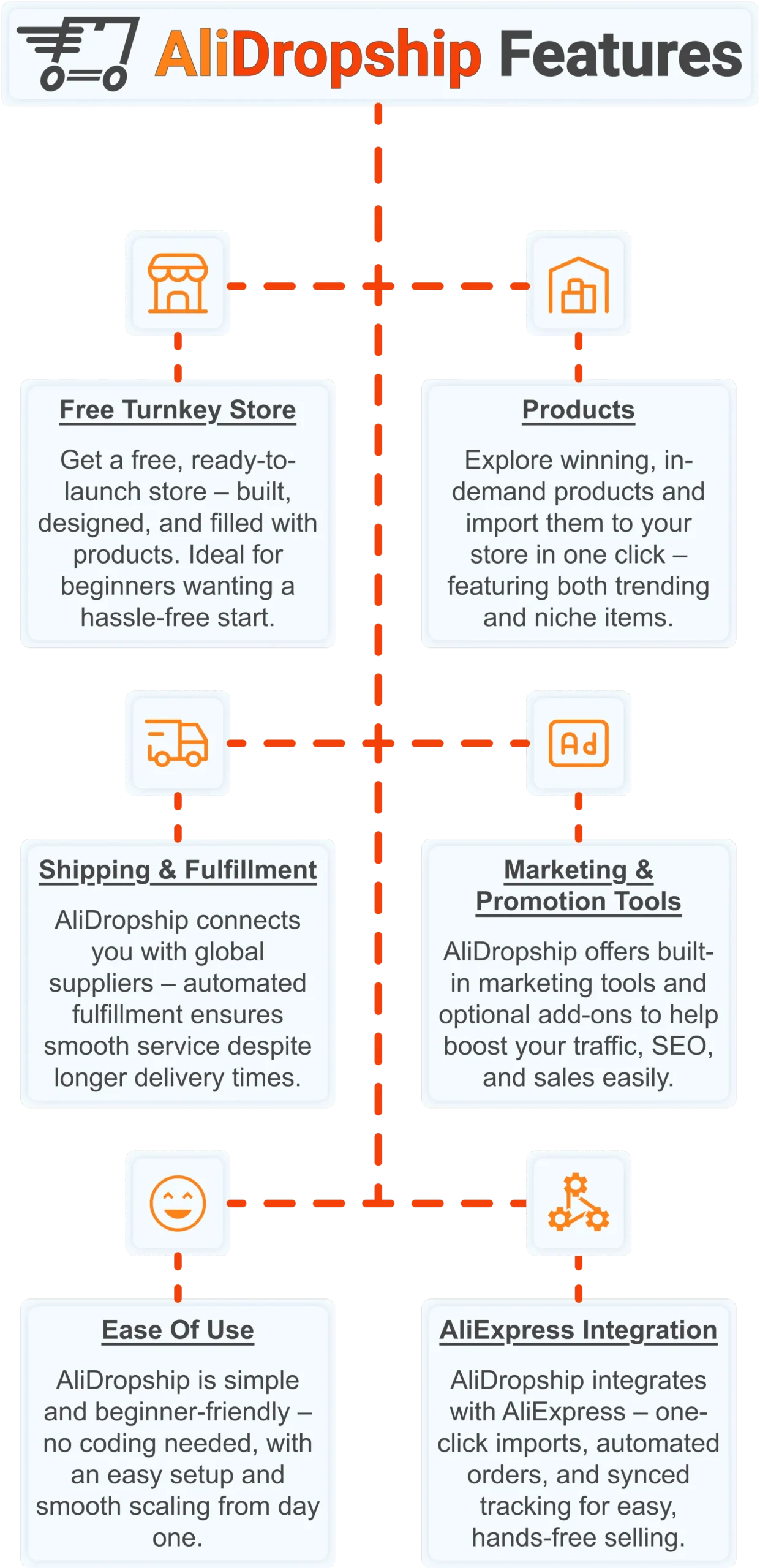
Free turnkey store ️
Get a free turnkey store – built, designed, and filled with products. Ideal for beginners wanting a hassle-free start, the store comes fully optimized to attract customers right away, saving you time on setup. Plus, it includes professional design elements to give your business a polished, trustworthy look from day one. This ready-made foundation makes it easy to move seamlessly into product selection.
Products
Once your store is set up, you can explore winning, in-demand products and import them in one click – featuring both trending and niche items. This wide selection lets you cater to diverse customer interests and test what works best. Regular updates ensure you always have fresh products, keeping your store competitive and relevant. With great products in place, smooth shipping becomes the next essential step.
Shipping & fulfillment
AliDropship connects you with global suppliers, and automated fulfillment ensures seamless order processing despite international delivery times. Customers receive real-time tracking updates, which builds confidence and trust in your store. Once shipping is handled reliably, you can focus on promoting your store and attracting traffic.
Marketing & promotion tools
To maximize sales, AliDropship offers built-in marketing tools and optional add-ons that help boost traffic, SEO, and conversions. From email campaigns and discounts to social media integration, these tools empower you to reach and retain customers without needing prior marketing experience. With promotion strategies in place, managing your business becomes simpler and more efficient.
Ease of use
AliDropship is beginner-friendly – no coding needed, with an intuitive dashboard that guides you through every step. Easy setup and smooth scaling let you expand your store without stress. As your business grows, adding new features, products, and marketing campaigns remains hassle-free, giving you more time to focus on sales.
AliExpress integration
Finally, AliDropship integrates seamlessly with AliExpress, enabling one-click imports, automated orders, and synced tracking. Your inventory stays up-to-date with the latest products and prices, while automated order processing frees you from manual tasks. Combined with the turnkey setup, reliable shipping, and built-in marketing tools, this integration ensures your dropshipping business is fully equipped for growth and success.
Frequently Asked Questions
What are the best writing apps to use in 2026?
The top picks are Google Docs, Microsoft Word, Scrivener, Grammarly, Hemingway Editor, Ulysses, and Evernote, each suited to a different type of writing. Google Docs is free and collaborative, making it ideal for everyday writing and team projects. Scrivener is built for long form projects like novels and dissertations and costs around 59 as a one time desktop purchase rather than a subscription. The right choice depends entirely on what and how a person writes, since no single app covers every use case equally well.
How much does Scrivener cost compared to other writing software?
Scrivener costs around 59 for the desktop version as a one time purchase, with no ongoing subscription required. This makes it unusually good value compared to subscription based tools built for long form writing. It includes a corkboard view, outline mode, and binder system that let writers move sections around and see the whole project structure at a glance. The learning curve is real, but most serious authors who switch to it report never going back to a simpler tool.
Is Grammarly free or does it require a paid subscription?
Grammarly offers both a free and a paid tier. The free version handles spelling and basic grammar corrections across browsers, desktop apps, and platforms like Google Docs or Gmail. The premium version adds style suggestions, tone detection, clarity improvements, and plagiarism checking. Grammarly AI rewrites have become genuinely useful in 2026, which makes upgrading to the premium plan easier to justify for regular writers.
Is Ulysses available on Windows or only on Apple devices?
Ulysses is available exclusively on Apple devices, including Mac, iPhone, and iPad, with no Windows or Android version available. It costs around 5.99 per month or 39.99 per year as a subscription, syncing across devices through iCloud. The interface is minimal by design, with no toolbars or menus cluttering the writing space. Writers who use Windows or Android will need to choose a different tool entirely, since Ulysses is simply not an option outside the Apple ecosystem.
Is it worth paying for a writing app instead of using a free one?
For most casual writers, free writing apps are genuinely sufficient, since Google Docs covers everyday writing and collaboration at no cost at all. Paid tools tend to earn their keep in depth and specialization, such as Scrivener organizational system, which has no real free equivalent for long form writing. Many paid writing apps offer free trials ranging from 7 to 30 days, which are worth using before committing. A reasonable approach is to start free, identify the specific limitation slowing progress down, then pay to solve that one specific problem.
Just as the best writing apps give you the tools to express your ideas clearly and build something you’re proud of, AliDropship gives you everything you need to build a real online business from scratch. Claim your free store and $100 voucher and see how far you can go.
 Previous post
