 ‧ Agnes Kazaryan ‧
March 16, 2026
‧ Agnes Kazaryan ‧
March 16, 2026  525 ‧
525 ‧
 0
0
Does it cost money to make a website? The honest answer is: sometimes nothing, sometimes a few hundred dollars a year – and it depends almost entirely on what you want to build and what you want it to do. You can get online for $0 today. But free comes with trade-offs that matter a lot if your goal is to actually earn from your site.
Quick answer: Making a basic website can cost nothing, but a functional, professional site typically runs $50–$300 per year. Ecommerce stores can start free or cost up to $600+ per year depending on the platform you choose.
This guide breaks down every real cost involved – domain names, hosting, builders, ecommerce platforms, and the hidden fees most comparisons skip over. By the end, you will know exactly what you need to spend, and what you can safely skip.
What does “making a website” actually mean in 2026?
When people ask does it cost money to make a website, they are usually picturing very different things. A personal blog is not the same as a freelance portfolio. A portfolio is nothing like an online store. And a drag-and-drop site builder is a completely different experience from a self-hosted WordPress setup or a custom-coded platform.
In 2026, making a website generally falls into one of four categories: a simple informational site, a content or blog site, a service or portfolio site, or an ecommerce store. Each comes with different cost expectations and different levels of effort.
The good news is that entry costs have dropped significantly. You do not need a developer or design agency to get a professional result anymore. What you do need is clarity on your goal – because whether you are sharing content, attracting clients, or selling products determines which costs are worth paying and which are completely optional.
How much does it realistically cost to make a website?
Here is an honest overview of what website-making typically costs in 2026, covering the core components: domain name, hosting, and the platform or builder you use.
As you can see, the cost of making a website has a genuinely wide range. A free builder gets you online for nothing – but you trade a custom domain, ad-free pages, and monetization options for that zero price tag. A self-managed ecommerce store gives you full control but demands more ongoing effort and investment.
One note on the $0 option: Free website tiers are real, but they come with platform branding in your URL (something like yourname.wixsite.com), display ads you cannot remove, and very limited storage or bandwidth. For anything you want to look professional or earn from, you will almost certainly need to spend at least something.
Most people starting out land somewhere between $50 and $200 per year for a clean, functional website. That covers a domain name ($10–$20/year) and basic hosting or a paid builder plan. The rest depends on what you add on top.
The main costs of making a website – broken down
Whether you are asking does it cost money to make a website for the first time or comparing options before committing, here is a clear breakdown of every cost category you will encounter.
Domain names
A domain name is your web address – the part people type to find you. In 2026, a standard .com domain costs between $10 and $20 per year through registrars like Namecheap, GoDaddy, or Squarespace Domains. Premium or very short domains can cost hundreds, but for a new site, a standard .com or .co is more than enough.
Important: Many website builders offer a free domain for the first year with a paid plan. Always check the renewal rate – some registrars charge $1 for year one and $15–$20 from year two onward.
Free subdomain vs. custom domain
If you use a free builder tier, you get a subdomain – something like yourshop.wixsite.com or yourname.wordpress.com. This works, but it signals to visitors that you have not invested in your own brand. For a hobby project it is fine. For anything commercial, a custom domain is almost always worth the $10–$20 per year.
Web hosting
Shared hosting
If you build on WordPress.org (the self-hosted version), you need web hosting – a server to store your files and deliver them to visitors. Shared hosting is the most affordable option, running $3–$10 per month ($36–$120 per year) from providers like Bluehost, SiteGround, or Hostinger. These entry plans handle sites with up to around 10,000 monthly visitors and require minimal technical setup.
Why this works in 2026: Shared hosting infrastructure has improved dramatically. For most new websites, it is genuinely all you need to start – upgrade only when your traffic demands it.
Managed hosting and VPS
Managed WordPress hosting or a virtual private server (VPS) gives you better performance and more control, but costs more – typically $20–$80 per month. This is worth considering once you have meaningful traffic, but for a site you are just launching, it is not necessary. Start cheap and scale when your numbers require it.
Website builders and platforms
Wix
Wix is one of the most popular drag-and-drop builders for personal and small business sites. The free plan gets you online with a Wix subdomain and display ads. Paid plans start around $17 per month (billed annually) for a custom domain and ad-free pages, rising to $35 per month for light ecommerce. For a basic website with no coding, Wix is competitive – but ecommerce features on lower tiers are limited.
Squarespace
Squarespace is a favourite among creatives and portfolio builders for its polished templates. Plans start at around $16 per month (billed annually) and include a free custom domain for the first year. Ecommerce functionality kicks in from $23 per month. There is no free tier – only a 14-day trial. If design quality matters and you are willing to pay a premium for it, Squarespace delivers. If your priority is keeping website creation costs low, other options stretch further.
WordPress.org (self-hosted)
WordPress.org is free software you host yourself. The platform costs nothing, but you pay for hosting ($3–$10 per month), a domain ($10–$20 per year), and potentially a premium theme ($30–$100 one-time) or plugins. Total first-year cost typically lands between $80 and $200. The trade-off is that WordPress requires more hands-on management – updates, security, backups – than a hosted builder.
Shopify
Shopify is the most widely used dedicated ecommerce platform. It costs $39 per month (billed monthly) or $29 per month on an annual plan. Add a domain, app fees, and transaction costs if you are not using Shopify Payments, and your annual website cost can easily reach $400–$700. Shopify is powerful – but the cost of making an ecommerce website here is higher than most beginners expect once the add-ons are factored in.
Hidden and ongoing costs to watch out for
The headline price of a hosting plan or a builder subscription is rarely the full story. Here are the cost categories that catch people off guard.
Premium themes and templates
Most builders include free themes, but premium templates from marketplaces like ThemeForest typically cost $30–$80 as a one-time fee. On WordPress, popular themes like Divi or Astra Pro run $70–$90 per year. These are optional – free themes are perfectly functional – but they can save significant design time if you want a polished result quickly.
Plugins and apps
On WordPress or Shopify, plugins and apps are where costs quietly accumulate. A contact form plugin, an SEO tool, a backup solution, a page builder – each might cost $0 to $10 per month. In aggregate, plugin costs can add $50–$300 per year to your overall website creation cost if you are not paying attention. Always check whether the free version of a plugin meets your needs before upgrading.
SSL certificates
An SSL certificate (the padlock in your browser address bar) was once a paid add-on. In 2026, almost all reputable hosts and builders include SSL for free via Let’s Encrypt. You should never need to pay for a basic SSL certificate. If a host is charging extra for it, that is a sign to consider switching providers.
Email hosting
A professional email address (yourname@yourdomain.com) is not included in most basic website plans. Google Workspace starts at $6 per user per month. Zoho Mail offers a free tier for one custom domain. This is optional when starting out – a free Gmail works fine initially – but a branded email address builds credibility quickly for any client-facing or business site.
Can you make a website completely for free?
Yes – technically. Platforms like Wix, WordPress.com, Weebly, and Google Sites all offer free tiers that let you publish a website without spending anything. But free in this context means accepting some real limitations: a branded subdomain instead of a custom domain, platform ads on your pages, limited storage and bandwidth, no ecommerce functionality, and reduced or no customer support.
For a personal project, a classroom exercise, or an idea you want to prototype quickly, a free website tier is a completely reasonable choice. For anything you want visitors to take seriously – a freelance portfolio, an online store, a business landing page – free tiers fall short fast. The moment you start thinking about converting visitors into customers, even a basic paid plan at $10–$20 per month typically pays for itself.
Important note: A free website builder is not the same as a free ecommerce store. A builder gives you a blank canvas you still have to design, fill with products, and drive traffic to. A turnkey ecommerce store like those offered through AliDropship comes designed, stocked, and ready to launch – at no upfront cost.
What affects the cost of making a website most?
If you are trying to figure out where to put your money, four factors have the biggest impact on what you will actually spend.
The first is whether you build it yourself or pay someone. DIY with a builder costs $0–$500 per year. Hiring a freelance web designer typically runs $500–$3,000 for a basic site. A web development agency can cost $5,000–$20,000 or more for a custom build. Unless you have specific technical requirements, modern builder tools are more than adequate for most business needs in 2026 – building it yourself is almost always the smarter financial decision when starting out.
The second factor is your ecommerce requirements. Adding a shopping cart and payment processing costs significantly more than a simple informational site. Shopify, WooCommerce, and similar platforms come with monthly fees, transaction fees, and the cost of apps to handle tax, shipping, and inventory.
The third factor is traffic volume. A site handling 500 visitors per month has very different hosting needs than one seeing 50,000 per month. Start with cheap shared hosting and scale when your numbers require it – do not over-invest in infrastructure before you have the audience to justify it.
The fourth factor is ongoing maintenance. Domain renewals, hosting renewals, plugin updates, security monitoring – these recurring costs are small individually but add up. Budget roughly $100–$200 per year for the ongoing cost of keeping a basic website alive and healthy.
Legal and ethical considerations when making a website
Making a website comes with a few legal responsibilities that most beginner guides skip over entirely. It is worth knowing these before you launch.
If your site collects any data from visitors – even just an email address through a contact form – you are subject to privacy laws. In the EU, that means GDPR compliance. In California, it means CCPA. At a minimum, this means having a privacy policy on your site. Free privacy policy generators like Termly or iubenda make this straightforward, and a basic version typically costs nothing or a small annual fee.
Key principle: Transparency with your visitors is both a legal requirement and good business practice. A privacy policy, cookie notice, and clear terms of use protect you and signal credibility to first-time visitors.
If you are running an ecommerce store, you also need to be clear about your refund policy, shipping times, and how returns are handled. For dropshipping specifically, orders you receive are fulfilled by a third-party supplier – visitors do not need to know the technical details, but they do need accurate information about delivery timeframes.
What to avoid absolutely: fake reviews or testimonials, misleading income claims in any ads you run, and purchasing followers or traffic to inflate the appearance of popularity. These tactics carry real legal and platform risks. What to do instead: build genuine social proof through product quality, responsive customer service, and earned reviews on verified platforms like Trustpilot.
Final thoughts – which website option fits your goals?
The answer to does it cost money to make a website is: a small amount, if you do it right. The more useful question is what kind of website you actually need – and whether a traditional website build is even the best route to your goal.
Complete beginner
If you are new to building an online presence and your goal is to earn money, the lowest-friction path is a free turnkey ecommerce store. You skip the domain research, hosting setup, theme decisions, product sourcing, and plugin configurations. You get a store that is built, designed, and stocked – and you can start driving traffic from day one. For a beginner with an income goal, this is a genuinely better starting point than spending 60–90 days building a DIY website from scratch.
Intermediate / part-time
If you have some experience and want a content-driven site or portfolio alongside an ecommerce presence, a self-hosted WordPress site at $80–$150 per year is a solid investment. Pair it with a dropshipping store to generate product revenue while you grow your content traffic. At this stage, organic content combined with a monetized store gives you multiple income streams without huge upfront costs.
Advanced / full-time goal
If your goal is a full-time income from your website within 12 months, the website creation cost question matters less than the revenue model question. A well-run dropshipping store targeting $30–$80 per day in profit is achievable within 60–90 days with consistent effort, strong product selection, and focused marketing. Investing in a paid Shopify plan, custom domain, and quality product photography makes sense at this stage – or you can start free with a turnkey store and reinvest early profits into scaling.
AliDropship: Your complete all-in-one solution for starting dropshipping in 2026
If you want the simplest possible way to start dropshipping – especially if you’re brand new – AliDropship remains one of the most beginner-friendly tools available in 2026. It brings together store creation, product imports, automation, and marketing into a single streamlined system designed to help you launch quickly and grow confidently.
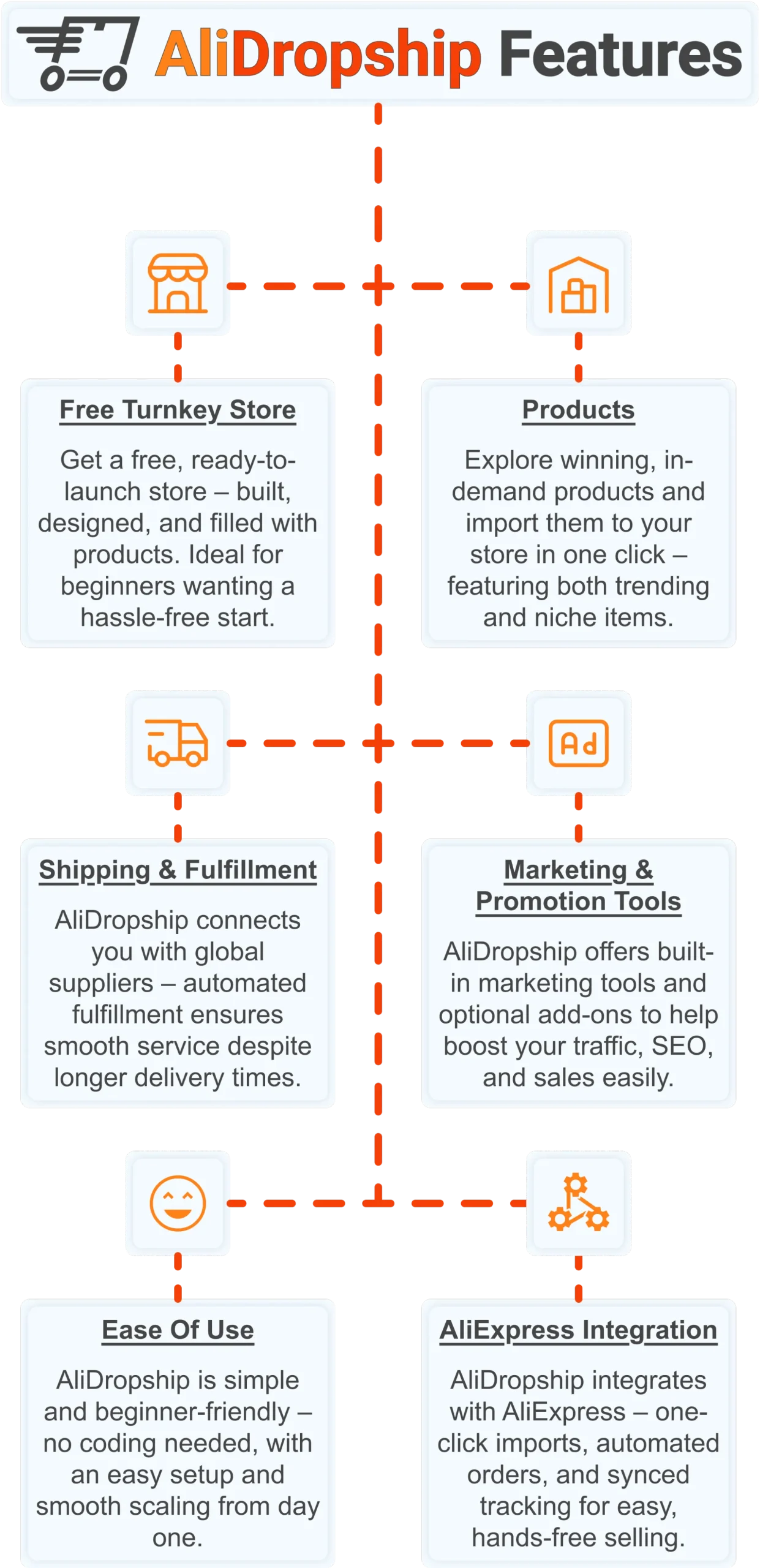
Free turnkey store ️
Get a free turnkey store – built, designed, and filled with products. Ideal for beginners wanting a hassle-free start, the store comes fully optimized to attract customers right away, saving you time on setup. Plus, it includes professional design elements to give your business a polished, trustworthy look from day one. This ready-made foundation makes it easy to move seamlessly into product selection.
Products
Once your store is set up, you can explore winning, in-demand products and import them in one click – featuring both trending and niche items. This wide selection lets you cater to diverse customer interests and test what works best. Regular updates ensure you always have fresh products, keeping your store competitive and relevant. With great products in place, smooth shipping becomes the next essential step.
Shipping & fulfillment
AliDropship connects you with global suppliers, and automated fulfillment ensures seamless order processing despite international delivery times. Customers receive real-time tracking updates, which builds confidence and trust in your store. Once shipping is handled reliably, you can focus on promoting your store and attracting traffic.
Marketing & promotion tools
To maximize sales, AliDropship offers built-in marketing tools and optional add-ons that help boost traffic, SEO, and conversions. From email campaigns and discounts to social media integration, these tools empower you to reach and retain customers without needing prior marketing experience. With promotion strategies in place, managing your business becomes simpler and more efficient.
Ease of use
AliDropship is beginner-friendly – no coding needed, with an intuitive dashboard that guides you through every step. Easy setup and smooth scaling let you expand your store without stress. As your business grows, adding new features, products, and marketing campaigns remains hassle-free, giving you more time to focus on sales.
AliExpress integration
Finally, AliDropship integrates seamlessly with AliExpress, enabling one-click imports, automated orders, and synced tracking. Your inventory stays up-to-date with the latest products and prices, while automated order processing frees you from manual tasks. Combined with the turnkey setup, reliable shipping, and built-in marketing tools, this integration ensures your dropshipping business is fully equipped for growth and success.
Making a website is one thing – making one that earns money from day one is another, and AliDropship closes that gap entirely. Claim your free turnkey ecommerce store and $100 voucher today.
Frequently asked questions
Does it cost money to make a website in 2026?
Making a basic website can cost nothing, but a functional, professional site typically runs 50 to 300 per year. Ecommerce stores can start free or reach 600 or more per year depending on the platform chosen. The main recurring costs are a domain name at 10 to 20 per year and basic hosting or a paid builder plan. Most people building a simple, clean website land somewhere between 50 and 200 per year in total.
How much does web hosting cost for a new website?
Shared hosting, the most affordable option for a self-hosted WordPress site, typically runs 3 to 10 per month, or 36 to 120 per year, through providers like Bluehost, SiteGround, or Hostinger. These entry-level plans can comfortably handle sites with up to around 10,000 monthly visitors. Managed WordPress hosting or a virtual private server costs more, usually 20 to 80 per month, and is worth considering once traffic grows. Starting with cheap shared hosting and upgrading later is the more cost-effective approach for most new sites.
Can you make a website completely for free?
Yes, platforms like Wix, WordPress.com, Weebly, and Google Sites all offer free tiers that let you publish a website without spending anything. Free tiers come with real trade-offs, including a branded subdomain instead of a custom domain, platform ads on your pages, and no ecommerce functionality. For a personal project or a quick prototype, a free tier is a reasonable choice, but anything meant to convert visitors into customers usually needs at least a basic paid plan. Even a modest plan at 10 to 20 per month typically pays for itself once a site starts generating leads or sales.
How much does it cost to build an ecommerce website compared to a basic site?
An ecommerce store costs meaningfully more than a basic informational site because of shopping cart functionality, payment processing, and transaction fees. Shopify, for example, costs 39 per month billed monthly, or 29 per month on an annual plan, and total annual costs can reach 400 to 700 once a domain, apps, and transaction fees are included. A self-managed ecommerce store on WordPress with WooCommerce typically runs 200 to 600 per year depending on plugins and hosting. A turnkey dropshipping store, by contrast, can start free with no upfront platform cost since the store comes already built and stocked.
What hidden costs should I watch for when making a website?
Premium themes and templates from marketplaces like ThemeForest typically cost 30 to 80 as a one-time fee, while popular WordPress themes such as Divi or Astra Pro run 70 to 90 per year. Plugins and apps can quietly add 50 to 300 per year in total if left unchecked, since individual tools often charge small monthly fees. Professional email hosting through Google Workspace starts at 6 per user per month, though free options like Zoho Mail cover a single custom domain. Budgeting roughly 100 to 200 per year for ongoing maintenance, including domain and hosting renewals, keeps a basic website running smoothly.
 Previous post
