 ‧ Agnes Kazaryan ‧
March 03, 2026
‧ Agnes Kazaryan ‧
March 03, 2026  16 ‧
16 ‧
 0
0
Running a small business in 2026 means wearing a lot of hats. You’re handling sales, chasing invoices, managing staff, and trying to market yourself – often all before lunch. The good news? The best apps for small business can take a huge chunk of that off your plate.
Quick Answer: The best apps for small business in 2026 include tools like Trello, QuickBooks, Slack, Canva, and HubSpot CRM – each covering a key area of operations so you can work smarter, not harder.
In this guide, we cover the top tools across every major category – productivity, communication, finance, marketing, CRM, and HR – with honest takes on what each one does well and where it falls short. Whether you’re just starting out or looking to streamline what you already have, there’s something here for every stage.
What are the best apps for small business in 2026?
Small business apps are software tools – usually cloud-based and mobile-friendly – that help you handle the day-to-day without drowning in manual work. The best ones automate the repetitive stuff, keep your team on the same page, and give you visibility over your finances and operations from anywhere.
In 2026, the market is more crowded than ever, but that’s actually a good thing. Most categories now have at least one solid free option, and paid plans are more competitive than they used to be. The challenge isn’t finding tools – it’s knowing which ones are actually worth your time.
We’ve broken everything down by category so you can zero in on exactly what your business needs right now.
How much time and money can the right apps save you?
The numbers above are realistic averages for solo operators and small teams of 2–10 people. Most categories have a free tier that covers the basics, so you can test before you commit to anything.
Important note: Time savings compound. One good productivity app might free up 3 hours a week – that’s 150+ hours a year you can put back into growth.
Productivity and task management apps
Keeping your projects and daily tasks organized is one of the first things you should tackle as a small business owner. Miss a deadline or lose track of a project, and it costs you money. The best apps for small business in this category are simple enough to use from day one but powerful enough to scale with you.
Trello
⭐⭐⭐⭐☆ (4.4/5 on App Store)
Trello uses boards, lists, and cards to give you a visual overview of everything on your plate. You can assign tasks, attach files, set due dates, and see your team’s progress in real time. It’s a great starting point if you’ve never used a project management tool before.
Pros: Intuitive visual layout, generous free plan, integrates with hundreds of apps.
Cons: Lacks built-in timeline views and workload management on the free tier.
Asana
⭐⭐⭐⭐⭐ (4.7/5 on App Store)
Asana is a step up in power. You can build projects, assign subtasks, set priorities, and track progress across timelines. It’s flexible enough for quick daily tasks and complex multi-month projects alike. Small teams that need more structure tend to love it.
Pros: Strong task tracking, multiple views (list, board, timeline), built-in automation.
Cons: Large projects with many nested tasks can feel cluttered to navigate.
Notion
⭐⭐⭐⭐⭐ (4.8/5 on App Store)
Notion is more than a task manager – it’s a full workspace. Notes, databases, project trackers, wikis, and team docs all live in one place. If you want to consolidate tools and keep everything centralized, Notion is hard to beat.
Pros: Highly flexible, great for knowledge management, strong free plan.
Cons: The sheer number of options can feel overwhelming when you first sign up.
Todoist
⭐⭐⭐⭐⭐ (4.8/5 on App Store)
Todoist is the no-fuss option. Clean interface, fast input, and reliable cross-platform sync. If you just need a task list that actually works and stays out of your way, this is it. Solo operators especially tend to stick with it long-term.
Pros: Dead simple to use, great mobile app, natural language task input.
Cons: Reminders, labels, and filters require a paid subscription.
Why this works in 2026: Remote and hybrid work has made task visibility more important than ever – having a shared space where everyone can see what’s in progress removes the need for constant check-in meetings.
Communication and collaboration apps
Whether your team is in the same room or spread across time zones, communication tools are essential. The best apps for small business in this space reduce back-and-forth email threads, keep conversations searchable, and make video meetings simple.
Slack
⭐⭐⭐⭐☆ (4.1/5 on App Store)
Slack remains the go-to for team messaging. You can organize conversations into channels by project or topic, share files, and connect with tools like Trello, Google Drive, and Asana. Messages are searchable, which saves a lot of time when you’re hunting down a decision made three weeks ago.
Pros: Real-time messaging, deep integrations, clean channel structure.
Cons: Can get noisy fast – requires good channel discipline to stay manageable.
Zoom
⭐⭐⭐⭐⭐ (4.7/5 on App Store)
Zoom is the reliable standard for video calls. You can run team meetings, client check-ins, or webinars without technical headaches. Recording sessions for future reference is a useful feature that solo owners and small teams get a lot of value from.
Pros: High-quality video and audio, screen sharing, easy scheduling.
Cons: Free plan caps group meetings at 40 minutes.
Microsoft Teams
⭐⭐⭐⭐⭐ (4.8/5 on App Store)
Teams combines chat, video, and file collaboration in a single platform. If your business already runs on Microsoft 365, this is the obvious choice – everything connects natively with Word, Excel, and OneDrive without any extra setup.
Pros: All-in-one communication, seamless Office integration, strong for larger teams.
Cons: Interface can feel heavy for small teams who only need basic messaging.
Pumble
⭐⭐⭐⭐⭐ (4.7/5 on App Store)
Pumble is the budget-friendly alternative to Slack. The free plan includes unlimited message history, video calls, and file sharing – which is unusual at no cost. It’s straightforward and genuinely useful for small businesses that don’t need enterprise-level integrations.
Pros: Generous free plan, unlimited messaging history, easy to learn.
Cons: Fewer third-party integrations than Slack or Teams.
Accounting and finance apps
Messy finances are one of the most common reasons small businesses stall. The right accounting app keeps your income and expenses visible, automates invoicing, and makes tax time a lot less painful. Several of the best apps for small business in this category are free to start.
QuickBooks Online
⭐⭐⭐⭐⭐ (4.7/5 on App Store)
QuickBooks is the most widely used accounting tool for small businesses. It handles invoicing, expense tracking, payroll, and tax prep in one place. It’s not the cheapest option, but it’s the most comprehensive – and your accountant will almost certainly know how to use it.
Pros: Full-featured, integrates with hundreds of tools, widely supported by accountants.
Cons: Pricing can feel steep if you’re a one-person operation just getting started.
FreshBooks
⭐⭐⭐⭐⭐ (4.7/5 on App Store)
FreshBooks is built for freelancers and service-based businesses. Its invoicing is genuinely excellent – clean templates, automatic payment reminders, and built-in time tracking so you can bill by the hour without any extra tools.
Pros: Very easy to use, great invoicing experience, cloud-based.
Cons: Limited advanced accounting features compared to QuickBooks.
Wave
⭐⭐⭐⭐☆ (4.4/5 on App Store)
Wave is free – and not in a limited, stripped-back way. You get invoicing, expense tracking, and bank connection at no cost. It’s not designed to scale to a 50-person team, but for solo owners and micro-businesses keeping an eye on cash flow, it’s genuinely impressive.
Pros: Free core features, simple interface, good for tight budgets.
Cons: Best suited to freelancers and very small businesses – scaling has limits.
Xero
⭐⭐⭐⭐⭐ (4.6/5 on App Store)
Xero is the cloud-based accounting platform built for growing businesses. It covers invoicing, bank reconciliation, and reporting, and connects with over 800 third-party apps. If you’re planning to scale in 2026, Xero is worth the investment early on.
Pros: Highly scalable, strong integrations, great for multi-currency businesses.
Cons: Reporting depth can feel overwhelming for first-time users.
Marketing, advertising, and social media apps
You don’t need a full marketing team to look professional and reach the right audience. The best apps for small business in this space let you design content, schedule posts, and run email campaigns without prior marketing experience.
Canva
⭐⭐⭐⭐⭐ (4.9/5 on App Store)
Canva has become the go-to design tool for non-designers. You can create social media graphics, ad banners, presentations, and email templates using thousands of ready-made layouts. The free plan is generous, and the paid version adds brand kits and premium assets.
Pros: Extremely easy to use, huge template library, free plan covers most needs.
Cons: Some advanced design features are locked behind the Pro subscription.
Buffer
⭐⭐⭐⭐⭐ (4.7/5 on App Store)
Buffer lets you plan, schedule, and publish social media posts across multiple platforms from one dashboard. It’s clean, affordable, and has solid analytics so you can see what’s actually performing. Great for owners who want a consistent online presence without logging into five different apps.
Pros: Clean interface, affordable plans, good built-in analytics.
Cons: Reporting isn’t as deep as Hootsuite for teams needing detailed performance data.
Hootsuite
⭐⭐⭐⭐⭐ (4.7/5 on App Store)
Hootsuite is more powerful than Buffer – it handles scheduling, social listening, engagement tracking, and team collaboration. If you’re running active social campaigns or managing multiple brand accounts, it justifies the higher price tag.
Pros: Handles multiple platforms, strong reporting, good for team-based social management.
Cons: Pricier than most alternatives, learning curve for new users.
Mailchimp
⭐⭐⭐⭐⭐ (4.9/5 on App Store)
Mailchimp is still the most accessible email marketing platform for small businesses. The free plan covers up to 500 contacts, and the drag-and-drop email builder means you don’t need any technical skills to put together a professional campaign.
Pros: Free starter plan, easy to use, integrates with most ecommerce platforms.
Cons: Costs scale quickly as your list grows, and advanced automations require paid tiers.
Customer relationship management (CRM) apps
Losing track of a warm lead because you forgot to follow up is a costly mistake. A good CRM keeps your contacts organized, reminds you when to reach out, and shows you exactly where each deal stands. Several of the best apps for small business in this category are free to start.
HubSpot CRM
⭐⭐⭐⭐⭐ (4.7/5 on App Store)
HubSpot’s free CRM is one of the most capable no-cost tools in any business category. You can manage deals, track email opens, schedule follow-ups, and see how contacts interact with your website – all without paying anything.
Pros: Genuinely powerful free plan, easy to use, strong marketing integrations.
Cons: Advanced automation and reporting require paid upgrades that can get expensive.
Zoho CRM
⭐⭐⭐⭐☆ (4.4/5 on App Store)
Zoho CRM is highly customizable and competitively priced. You can automate workflows, track sales pipelines, and generate reports without a complicated setup. It’s a strong mid-tier option for small teams that need more than HubSpot’s free plan but don’t want to pay Salesforce prices.
Pros: Good automation features, affordable, scalable across team sizes.
Cons: Takes time to learn all the features – not the fastest tool to get up and running.
Salesforce Essentials
⭐⭐⭐⭐⭐ (4.8/5 on App Store)
Salesforce is known for enterprise clients, but the Essentials plan is designed for small businesses. It combines contact management, task tracking, and detailed reporting in one reliable platform. Worth considering if you’re planning for significant growth.
Pros: Comprehensive feature set, highly reliable, integrates with almost everything.
Cons: More expensive than other small business CRM options.
Capsule CRM
⭐⭐⭐⭐☆ (4.5/5 on App Store)
Capsule is the simplest CRM on this list. If you just want a clean place to track clients, notes, and opportunities without a steep learning curve, Capsule gets it done. It’s affordable and works well for service-based businesses managing a handful of key accounts.
Pros: Very clean interface, easy to get started, affordable plans.
Cons: Limited customization for complex pipelines or larger teams.
Employee management and HR apps
Even a small team needs structure. Scheduling, time tracking, payroll, and onboarding – handled manually – eat up hours that should go toward running the business. The best apps for small business in this category reduce admin and help you stay compliant without a dedicated HR department.
QuickBooks Workforce
⭐⭐⭐⭐⭐ (4.6/5 on App Store)
QuickBooks Workforce is a time-tracking and scheduling tool that syncs directly with QuickBooks payroll. Employees can clock in from their phones or desktops, and hours flow straight into payroll without manual entry – which removes a major source of errors.
Pros: Mobile-friendly, integrates with QuickBooks payroll, detailed reporting.
Cons: Setup takes time, and some users find the interface less intuitive than alternatives.
Deputy
⭐⭐⭐⭐⭐ (4.7/5 on App Store)
Deputy is purpose-built for scheduling hourly and part-time staff. You can build and share shift rosters, track attendance, and manage time-off requests from one dashboard. It’s popular in hospitality, retail, and any business with variable shift patterns.
Pros: Easy scheduling, strong mobile app, great for managing hourly teams.
Cons: Limited broader HR features, and costs rise as your headcount grows.
Gusto
⭐⭐⭐⭐⭐ (4.8/5 on App Store)
Gusto handles payroll, benefits, tax filings, and HR compliance in one place. It’s designed specifically for small businesses and automates a lot of the paperwork that otherwise takes hours every month. If you’re paying employees and need to stay compliant, Gusto is one of the most complete options available.
Pros: Full payroll and HR solution, clear interface, handles compliance automatically.
Cons: Higher monthly cost than basic payroll apps, limited international payroll support.
BambooHR
⭐⭐⭐⭐⭐ (4.7/5 on App Store)
BambooHR goes beyond payroll and focuses on the broader people side of running a business. Onboarding workflows, performance reviews, employee records, and time-off tracking all live in one system. It’s a good fit for businesses that are growing and want more structure around how they manage people.
Pros: Strong onboarding tools, performance management, centralized employee data.
Cons: Pricing isn’t listed publicly, and the feature depth may be more than very small teams need.
How to choose the right apps for your small business
With so many options, it’s easy to end up with a stack of tools that overlap, don’t talk to each other, and cost more than they save. Here’s a more focused way to think about it.
Start by identifying the one area causing the most friction right now – missed deadlines, unpaid invoices, or chaotic communication. That’s where your first app investment should go. Adding one strong tool at a time means you actually learn to use it properly before piling on more.
Prioritize tools that integrate with each other. A CRM that connects with your email platform, or an accounting app that syncs with your scheduling tool, creates a lot more value than the same tools running in isolation.
Always test the free plan first. Most of the best apps for small business listed here have one. You’ll know within a week or two whether the workflow actually suits how you operate – before you spend anything.
Important: Mobile access matters more than it used to. If a tool doesn’t have a solid app, you’ll find yourself stuck at a desk for things that should take 30 seconds on your phone.
Final thoughts – choosing your toolkit by where you are right now
The right setup looks different depending on your stage. Here’s a quick breakdown by profile.
Complete beginner: Start with Wave (free accounting), Trello or Todoist (task management), and HubSpot CRM (free). That covers your three biggest operational needs at zero cost.
Intermediate / part-time: Add Canva for marketing visuals, Buffer or Mailchimp for audience building, and Slack for team communication. You’re looking at $0–$50/month depending on list sizes and team headcount.
Advanced / full-time goal: QuickBooks Online or Xero for accounting, Asana for project management, Hootsuite for social, Zoho or Salesforce Essentials for CRM, and Gusto or BambooHR if you have employees. Budget $100–$250/month for a full professional stack – and expect that investment to save you significantly more in time and errors.
The best apps for small business aren’t the ones with the longest feature lists – they’re the ones you’ll actually use consistently. Start simple, build deliberately, and focus on tools that free you up to do the work that actually grows your business.
AliDropship: Your complete all-in-one solution for starting dropshipping in 2026
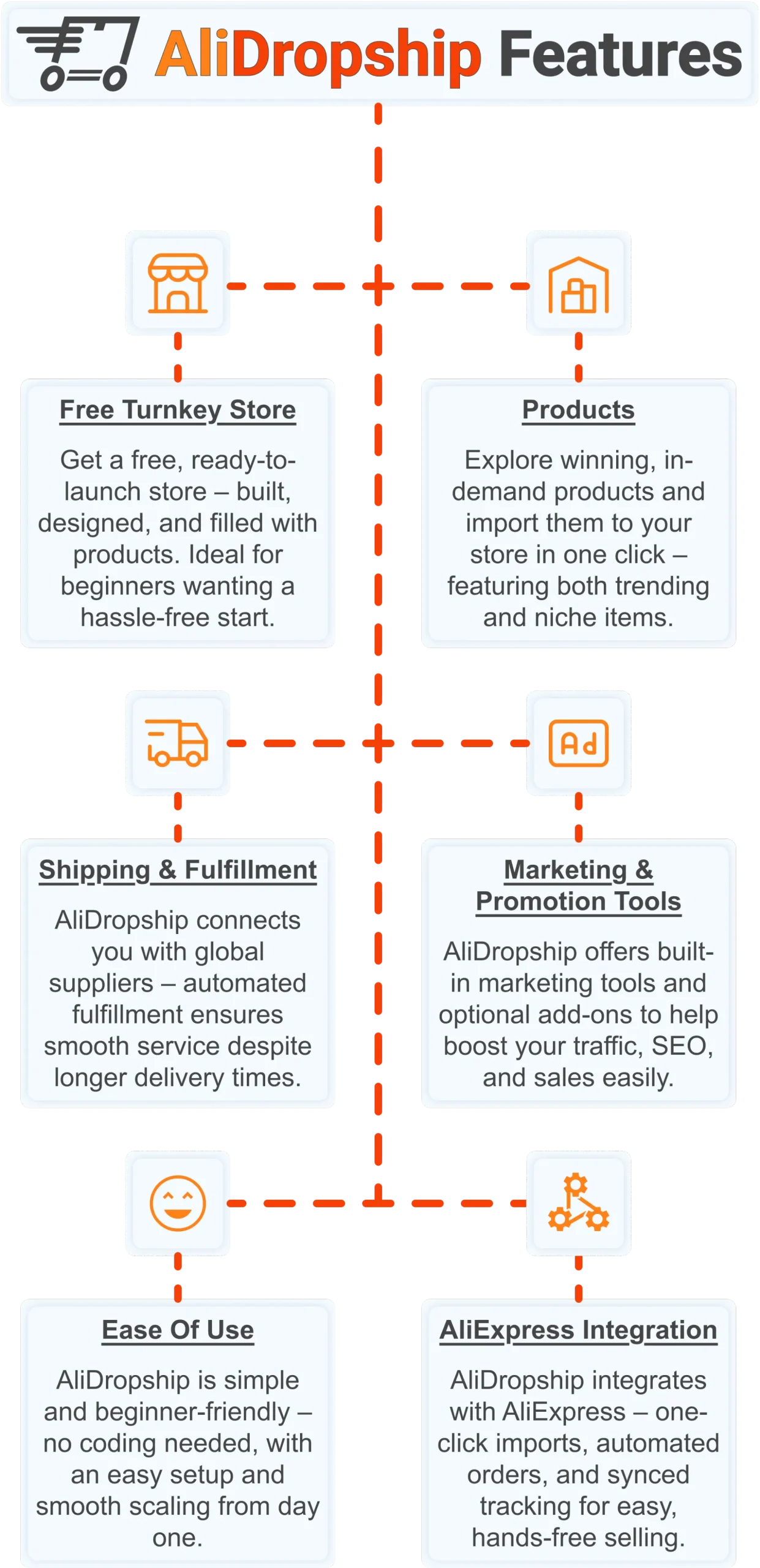
If you want the simplest possible way to start dropshipping – especially if you’re brand new – AliDropship remains one of the most beginner-friendly tools available in 2026. It brings together store creation, product imports, automation, and marketing into a single streamlined system designed to help you launch quickly and grow confidently.
Free turnkey store ️
Get a free turnkey store – built, designed, and filled with products. Ideal for beginners wanting a hassle-free start, the store comes fully optimized to attract customers right away, saving you time on setup. Plus, it includes professional design elements to give your business a polished, trustworthy look from day one. This ready-made foundation makes it easy to move seamlessly into product selection.
Products
Once your store is set up, you can explore winning, in-demand products and import them in one click – featuring both trending and niche items. This wide selection lets you cater to diverse customer interests and test what works best. Regular updates ensure you always have fresh products, keeping your store competitive and relevant. With great products in place, smooth shipping becomes the next essential step.
Shipping & fulfillment
AliDropship connects you with global suppliers, and automated fulfillment ensures seamless order processing despite international delivery times. Customers receive real-time tracking updates, which builds confidence and trust in your store. Once shipping is handled reliably, you can focus on promoting your store and attracting traffic.
Marketing & promotion tools
To maximize sales, AliDropship offers built-in marketing tools and optional add-ons that help boost traffic, SEO, and conversions. From email campaigns and discounts to social media integration, these tools empower you to reach and retain customers without needing prior marketing experience. With promotion strategies in place, managing your business becomes simpler and more efficient.
Ease of use
AliDropship is beginner-friendly – no coding needed, with an intuitive dashboard that guides you through every step. Easy setup and smooth scaling let you expand your store without stress. As your business grows, adding new features, products, and marketing campaigns remains hassle-free, giving you more time to focus on sales.
AliExpress integration
Finally, AliDropship integrates seamlessly with AliExpress, enabling one-click imports, automated orders, and synced tracking. Your inventory stays up-to-date with the latest products and prices, while automated order processing frees you from manual tasks. Combined with the turnkey setup, reliable shipping, and built-in marketing tools, this integration ensures your dropshipping business is fully equipped for growth and success.
If you’re building a small business toolkit in 2026, AliDropship gives you everything you need to launch an online store without juggling a dozen separate apps. Claim your free store and $100 voucher to get started today.
 Previous post
