 ‧ Agnes Kazaryan ‧
March 02, 2026
‧ Agnes Kazaryan ‧
March 02, 2026  18 ‧
18 ‧
 0
0
There are thousands of apps promising to make you more productive. Most of them collect dust after two weeks. The ones that actually stick are simple, focused, and fit naturally into the way you already work. This guide cuts through the noise and shows you the best productivity apps worth using in 2026 – broken down by category, with honest notes on who each one is actually for.
Quick Answer: The best productivity apps in 2026 include Todoist and Trello for task management, Toggl and RescueTime for time tracking, Notion and Evernote for notes, Slack and Asana for teams, and Zapier for automation. The right mix depends entirely on how you work – and there is no single app that does it all.
Whether you are a freelancer juggling multiple clients, a remote worker drowning in meetings, or someone who just wants to get through their to-do list without losing their mind – the right productivity app can genuinely change how much you get done each day. Let’s get into it.
What are productivity apps and why do they matter in 2026?
Productivity apps are digital tools designed to help you organize tasks, manage your time, stay focused, and work more efficiently – whether solo or as part of a team. They range from simple to-do list managers to complex automation platforms that connect dozens of services together.
In 2026, the case for using them is stronger than ever. Remote and hybrid work is the norm for hundreds of millions of people globally. AI features are now built directly into tools like Notion, Todoist, and Slack, making them smarter and faster to use. And with attention spans under constant assault from notifications, social media, and app switching, having a structured system is less of a luxury and more of a necessity.
The key is not downloading every app on this list. It is finding the two or three that solve your specific problems and actually using them consistently.
How much time can the best productivity apps realistically save you?
This varies a lot depending on your workflow, but the numbers from real-world studies are hard to ignore. According to research by McKinsey, knowledge workers spend around 28% of their workweek managing email alone – and that is before you factor in context-switching, disorganized tasks, and manual processes that could be automated.
These are realistic estimates based on average use – not best-case scenarios. Results depend heavily on how consistently you use the tool and whether it genuinely fits your workflow. The automation category tends to deliver the biggest return once it is set up properly.
How to choose the right productivity apps for you
Before you start downloading, it is worth spending five minutes thinking about what you actually need. The most common mistake people make is picking an app based on what is trending, rather than what solves their specific problem.
Here are the three things that matter most when choosing productivity apps for work.
Ease of use
If an app has a steep learning curve or a cluttered interface, you will stop using it within a week. The best productivity apps feel intuitive from day one. You should be able to get your first task, note, or timer set up in under two minutes without watching a tutorial. If you cannot, move on.
Integration with tools you already use
The best productivity setup is one where your tools talk to each other. If you live inside Google Workspace, pick apps that connect to it natively – Google Keep, Google Calendar, and Asana all integrate well. If you are a Microsoft 365 user, Microsoft To-Do and Teams are obvious choices. Fighting your existing ecosystem is a fast route to abandoning new tools.
Focused features vs. all-in-one platforms
Some people thrive with one flexible platform like Notion that handles notes, tasks, and databases all in one place. Others do better with a dedicated task app, a separate calendar, and a separate time tracker – each doing one thing exceptionally well. Neither approach is wrong. The question is whether you want depth in one tool or breadth across several.
Important note: Start with one new app at a time. Adding five productivity tools at once usually results in using none of them effectively.
Best task management apps in 2026
Task management is the foundation of any solid productivity system. If you do not have a clear, organized list of what needs to get done – and when – everything else falls apart. These are the best productivity apps for keeping your tasks under control.
Todoist
Todoist remains one of the most reliable task managers available in 2026. It is clean, fast, and works across every device. You can organize tasks by project, assign priority levels, set recurring deadlines, and share tasks with others. The AI-powered suggestions for scheduling and organizing tasks – added in recent updates – make it genuinely smarter than it was a few years ago. It is ideal for individuals and small teams who want power without complexity.
Earning potential: Free tier available. Pro plan runs around $4/month billed annually.
Trello
Trello is the go-to option if you think visually. It uses a kanban-style board system – columns and cards – that makes it easy to see what is in progress, what is waiting, and what is done. It is particularly popular for project tracking and content pipelines. Trello’s free plan is generous, and it integrates with hundreds of other tools via its Power-Ups feature.
Microsoft To-Do
If you are already inside the Microsoft 365 ecosystem, To-Do is hard to beat for simplicity. It syncs across all devices, connects with Outlook tasks and calendar, and supports daily planning through its “My Day” feature. It is not the most feature-rich app on this list, but for straightforward task management it gets the job done with zero friction.
Why this works in 2026: Task management apps reduce cognitive load by externalizing your to-do list, freeing up mental bandwidth for the actual work.
Best time management apps in 2026
Most people dramatically underestimate how long tasks take and overestimate how much focused work they are actually doing. Time tracking apps fix that by giving you honest data about where your hours go. These are the best apps for time management available right now.
Toggl Track
Toggl Track is the easiest time tracker to start using today. You hit a button when you start a task, hit it again when you stop, and Toggl logs everything automatically. Reports are clear and exportable, making it a favourite among freelancers who bill by the hour. The free tier covers most individual needs, and the browser extension makes it easy to track time directly from Trello, Asana, or Gmail.
RescueTime
RescueTime runs in the background and automatically tracks how long you spend on every app and website – without you having to log anything manually. At the end of each day you get a breakdown of productive vs. unproductive time. It is particularly useful for people who suspect they are wasting time but are not sure exactly where. The Focus Session feature also lets you block distracting sites during work blocks.
Clockify
Clockify is the best free time tracking option for teams. You can track time across multiple projects, set hourly rates, generate invoices, and run reports across your whole team – all at no cost. For small businesses and agencies that need time tracking without paying per seat, Clockify is the obvious choice.
Why this works in 2026: You cannot improve what you do not measure. Time tracking apps give you real data to make smarter decisions about how you spend your working hours.
Best focus apps to cut out distractions
Staying focused is arguably the hardest part of being productive in 2026. The average person checks their phone 96 times a day according to research by Asurion – that is roughly once every ten minutes. These focus apps help you take back control of your attention.
Forest
Forest turns focus sessions into a game. You plant a virtual tree when you start working, and it grows as long as you stay off your phone. If you leave the app, the tree dies. It sounds simple – because it is – but the visual feedback loop is surprisingly effective. Forest also partners with a real tree-planting organization, so your focus sessions contribute to actual reforestation. It is available on iOS, Android, and as a browser extension.
Freedom
Freedom lets you block any website or app across all your devices simultaneously – Mac, Windows, iOS, and Android – from a single dashboard. You can schedule recurring sessions so distractions are automatically blocked during your work hours without you having to think about it. It is one of the most robust focus apps available and particularly useful for people who work across multiple devices.
Cold Turkey
For anyone who needs a harder lock, Cold Turkey blocks distracting sites and apps so completely that you cannot override the block until the timer runs out – even if you restart your computer. It is not for everyone, but if you find yourself overriding softer blockers, Cold Turkey is the answer. The free version covers basic website blocking; the paid version adds app blocking and scheduling.
Why this works in 2026: Distraction blocking apps remove the willpower decision entirely. Instead of choosing not to open social media, the choice is made for you.
Best note-taking apps for staying organized
A good note-taking app is like an external brain. It captures ideas before they disappear, organizes reference material so you can find it later, and keeps meeting notes, project briefs, and research all in one place. These are the top note-taking apps worth using in 2026.
Notion
Notion has evolved into one of the most versatile productivity apps available. At its core it is a note-taking tool, but it also handles databases, kanban boards, wikis, project trackers, and more. The AI assistant – built directly into the editor – can summarize notes, generate content, and answer questions about your workspace. Notion is ideal for people who want a single hub for everything, but it does take some setup time to get right.
Evernote
Evernote has been around for over fifteen years and remains one of the most powerful note-taking apps for people who collect a lot of information. Web clipping, document scanning, PDF annotation, and cross-device sync are all well-implemented. The search function is particularly strong – it can even search text inside images and scanned documents. Evernote is best for researchers, writers, and anyone who accumulates a lot of reference material.
Google Keep
Google Keep is the fastest, most frictionless option on this list. Open it, type a note, close it. It syncs instantly across all Google devices, integrates with Google Docs and Calendar, and is completely free. It is not feature-rich, but for quick capture of ideas, shopping lists, and short meeting notes, nothing is faster.
Best collaboration apps for teams
If you work with other people, productivity is not just about what you do – it is about how well your team communicates and coordinates. These collaboration apps are among the best productivity tools for work in 2026.
Slack
Slack is the standard for team messaging, and for good reason. Organized channels keep conversations sorted by topic or project, direct messaging handles quick one-on-ones, and integrations with tools like Google Drive, Asana, Zoom, and Notion mean you can manage a huge amount of work without leaving the app. The AI-powered search and message summaries added in recent updates are genuinely useful for catching up on long threads quickly.
Asana
Asana is built specifically for project management and team task coordination. You can create projects, assign tasks with due dates and owners, set dependencies, and track progress through timeline or board views. It is a step up from Trello in terms of structure and reporting, making it well-suited for teams with complex workflows. The free tier supports up to 10 users, which covers most small teams.
Microsoft Teams
For organizations already on Microsoft 365, Teams is the obvious collaboration hub. It combines chat, video calling, file sharing, and real-time document collaboration in one place. The deep integration with Word, Excel, and SharePoint makes it hard to beat for corporate environments. It is not as nimble as Slack for casual teams, but for structured businesses it is hard to justify switching away.
Why this works in 2026: Collaboration apps reduce the email back-and-forth that kills productivity, keeping communication fast, organized, and searchable.
Best automation apps to save time on repetitive tasks
Automation is where productivity apps deliver the highest return on investment. If you spend any part of your week doing the same thing manually – copying data between apps, sending the same type of email, updating spreadsheets – an automation app can handle it for you, running in the background while you focus on work that actually requires your attention.
Zapier
Zapier connects over 7,000 apps and lets you build automated workflows – called Zaps – without writing any code. Common examples include automatically saving email attachments to Google Drive, creating Trello cards from new form submissions, or posting Slack messages when a new lead hits your CRM. The free tier allows five active Zaps, which is enough to test the concept. Paid plans start at around $20/month.
Make (formerly Integromat)
Make offers more visual, flexible automation than Zapier at a lower price point. You build workflows by dragging and connecting modules on a canvas, which makes complex multi-step automations easier to understand and debug. It is particularly popular with small business owners and marketers who need more logic and branching in their workflows. The free tier is more generous than Zapier’s.
IFTTT
IFTTT (If This, Then That) is the simplest entry point into automation. It works on a basic trigger-action model – if something happens in one app, do something in another. It is not as powerful as Zapier or Make for complex workflows, but for connecting consumer apps like smart home devices, social media accounts, and personal productivity tools, it is fast to set up and free to start.
Why this works in 2026: Even automating one or two repetitive tasks per day adds up to hours saved per week – time that goes back into your actual work.
Best habit-tracking apps for long-term productivity
Productivity is not just about what you do today – it is about the systems and habits you build over time. Habit-tracking apps help you stay consistent with the routines that support your best work, whether that is daily planning, regular exercise, reading, or anything else you want to make automatic.
Habitica
Habitica turns habit-building into an RPG. You create a character, and completing your real-life habits and tasks earns you in-game rewards – gear, experience points, and pets. It sounds gimmicky, but the gamification is effective for people who are otherwise bored by habit trackers. There is also a social element where you can join parties and complete quests with friends, adding accountability.
Streaks
Streaks is a clean, minimal iOS app that tracks up to twelve habits simultaneously. It integrates with Apple Health, so habits like walking, meditation, or sleep can be tracked automatically without manual input. The interface is simple and satisfying to use – the kind of app that makes you want to open it every morning. Best for iPhone users who want something straightforward.
Way of Life
Way of Life offers detailed tracking with color-coded charts that show your progress across each habit over time. The visual feedback makes it easy to spot patterns – which habits you are nailing, which ones keep slipping, and how changes in your routine correlate with your overall consistency. It is available on iOS and is well-suited for data-oriented people who like to analyze their behavior.
Best cloud storage apps for file organization
Productivity breaks down fast when you cannot find the file you need. Cloud storage apps keep your documents organized, backed up, and accessible from any device – which is non-negotiable if you work across multiple computers or collaborate with others.
Google Drive
Google Drive offers 15GB of free storage and integrates directly with Google Docs, Sheets, and Slides – making real-time collaboration on documents seamless. It is the default choice for anyone already in the Google ecosystem and one of the most widely used cloud storage solutions in the world. Paid plans through Google One start at $2.99/month for 100GB.
Dropbox
Dropbox is known for the reliability of its file syncing – changes appear across all devices almost instantly. It handles large files well, integrates with tools like Slack and Zoom, and includes a Paper feature for collaborative documents. Dropbox is particularly popular with creative teams and agencies who regularly transfer large media files. The free tier is limited to 2GB, so most users will need a paid plan.
OneDrive
Microsoft’s OneDrive is the natural choice for Windows users and Microsoft 365 subscribers. It integrates directly into the Windows file explorer, backs up your desktop and documents automatically, and connects with Word, Excel, and Teams. If your organization runs on Microsoft products, OneDrive is likely already available to you as part of your subscription.
What to watch out for when using productivity apps
Not every productivity app is worth your time, and some patterns of use can actually make you less productive. Here is what to avoid.
Key principle: More apps do not equal more productivity. Every new tool you add is a new system you need to maintain.
The biggest trap is what researchers call “productivity theater” – spending so much time organizing, customizing, and switching between apps that you never actually get work done. Notion databases and Trello boards are only valuable if the work inside them moves forward. A simple text file you actually use beats a beautiful project management system you avoid opening.
Also be cautious with free trials that lock your data behind a paywall. Always check export options before committing to a tool. And if you are using automation apps, audit your Zaps or workflows quarterly – it is easy to end up with dozens of automations running that no longer serve a purpose.
Important: Avoid building your entire workflow around a single app that does not have a reliable export function. If the service shuts down or changes its pricing, you want to be able to take your data with you.
Final thoughts: how to pick the right combination for you
The best productivity apps are the ones that match your actual work style – not the most popular ones on a top-ten list. Here is a quick guide based on where you are right now.
Complete beginner: Start with just two apps. A task manager (Todoist or Microsoft To-Do) and a note-taking app (Google Keep or Notion). Get comfortable with those before adding anything else.
Intermediate / part-time worker: Add a time tracker (Toggl or Clockify) to understand where your hours are going, and a focus app (Forest or Freedom) for deep work sessions. If you collaborate with others, add Slack or Asana depending on your team’s needs.
Advanced / full-time or business owner: Build an automation layer with Zapier or Make to handle repetitive tasks. Use cloud storage (Google Drive or OneDrive) to keep files organized and accessible. Consider Notion as a central hub that replaces several standalone apps. At this level, the goal is a connected system where tools work together – not a collection of disconnected apps.
The single best piece of advice: pick one app from this list, use it for 30 days straight, and then decide if you need to add anything. Consistency beats complexity every time.
AliDropship: Your complete all-in-one solution for starting dropshipping in 2026
If you want the simplest possible way to start dropshipping – especially if you’re brand new – AliDropship remains one of the most beginner-friendly tools available in 2026. It brings together store creation, product imports, automation, and marketing into a single streamlined system designed to help you launch quickly and grow confidently.
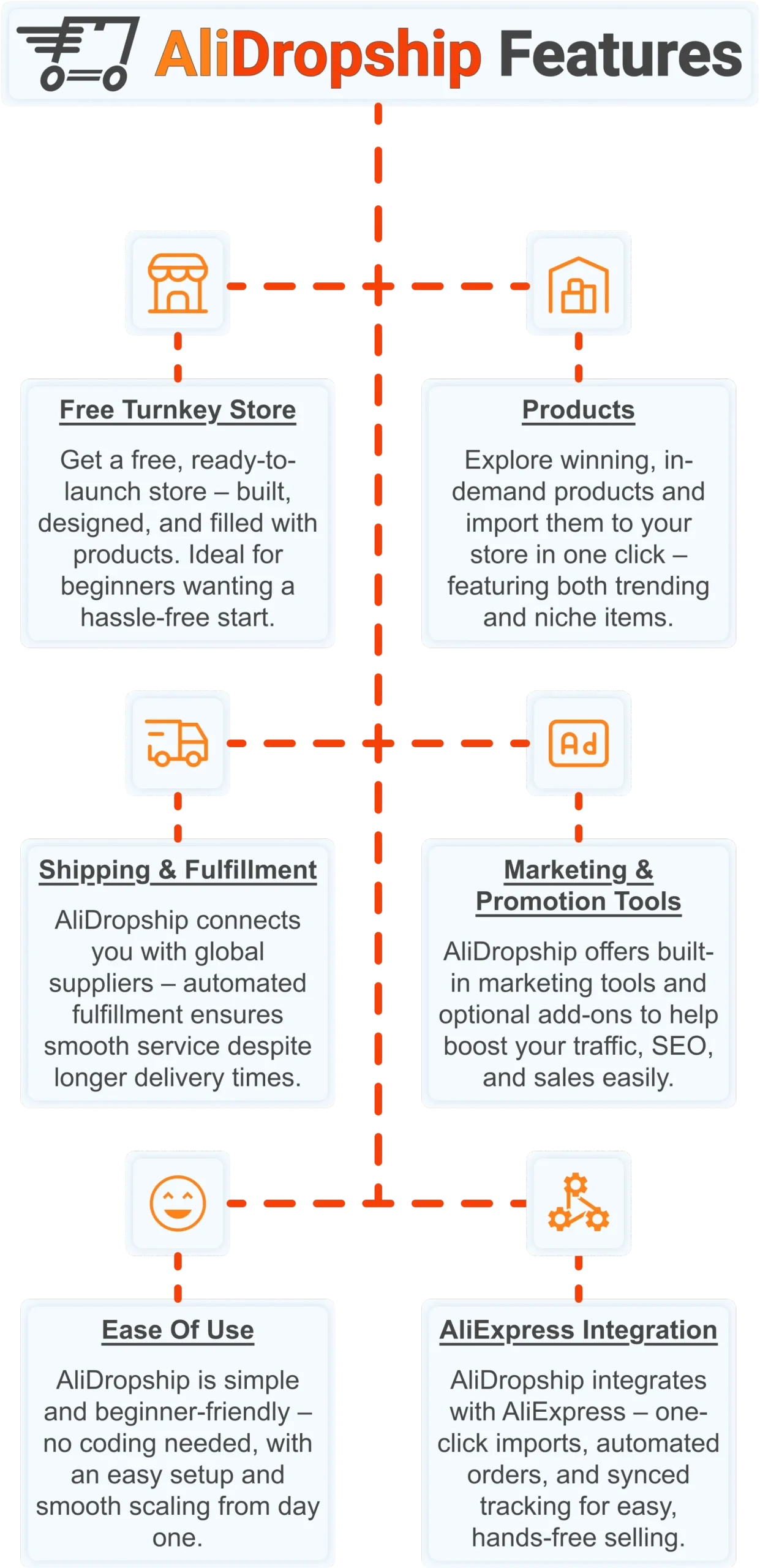
Free turnkey store ️
Get a free turnkey store – built, designed, and filled with products. Ideal for beginners wanting a hassle-free start, the store comes fully optimized to attract customers right away, saving you time on setup. Plus, it includes professional design elements to give your business a polished, trustworthy look from day one. This ready-made foundation makes it easy to move seamlessly into product selection.
Products
Once your store is set up, you can explore winning, in-demand products and import them in one click – featuring both trending and niche items. This wide selection lets you cater to diverse customer interests and test what works best. Regular updates ensure you always have fresh products, keeping your store competitive and relevant. With great products in place, smooth shipping becomes the next essential step.
Shipping & fulfillment
AliDropship connects you with global suppliers, and automated fulfillment ensures seamless order processing despite international delivery times. Customers receive real-time tracking updates, which builds confidence and trust in your store. Once shipping is handled reliably, you can focus on promoting your store and attracting traffic.
Marketing & promotion tools
To maximize sales, AliDropship offers built-in marketing tools and optional add-ons that help boost traffic, SEO, and conversions. From email campaigns and discounts to social media integration, these tools empower you to reach and retain customers without needing prior marketing experience. With promotion strategies in place, managing your business becomes simpler and more efficient.
Ease of use
AliDropship is beginner-friendly – no coding needed, with an intuitive dashboard that guides you through every step. Easy setup and smooth scaling let you expand your store without stress. As your business grows, adding new features, products, and marketing campaigns remains hassle-free, giving you more time to focus on sales.
AliExpress integration
Finally, AliDropship integrates seamlessly with AliExpress, enabling one-click imports, automated orders, and synced tracking. Your inventory stays up-to-date with the latest products and prices, while automated order processing frees you from manual tasks. Combined with the turnkey setup, reliable shipping, and built-in marketing tools, this integration ensures your dropshipping business is fully equipped for growth and success.
The same drive to work smarter that led you here can power a business of your own – with the right tools behind you. Claim your free store and $100 voucher with AliDropship today.
 Previous post
