 ‧ Agnes Kazaryan ‧
March 02, 2026
‧ Agnes Kazaryan ‧
March 02, 2026  37 ‧
37 ‧
 0
0
Most people who try ChatGPT for the first time get a decent answer, shrug, and move on. That’s not because the tool isn’t useful – it’s because they never learned how to actually work with it. And that gap between “tried it once” and “use it every day” is exactly what this guide closes.
Quick Answer: To use ChatGPT effectively, write clear prompts with context and a goal, read the response critically, then refine rather than restart. The more specific your input, the more useful the output.
Whether you want to save time at work, write better content, or run an online store more efficiently, knowing how to use ChatGPT properly changes what’s possible. This guide walks you through everything – from your first login to advanced prompting techniques and real ecommerce applications.
What is ChatGPT and why does it matter in 2026?
ChatGPT is an AI chatbot built on a large language model. It generates text by identifying patterns across enormous volumes of written data – so when you ask it something, it’s predicting the most useful response based on everything it’s been trained on.
It doesn’t “think” the way humans do. It doesn’t browse the internet in real time (unless a plugin enables that). And it isn’t always right. What it is exceptionally good at is anything involving language – explaining concepts, drafting content, summarizing documents, brainstorming ideas, rewriting text, and generating structured output on demand.
In 2026, ChatGPT has become one of the most widely used productivity tools in the world. Millions of people use it daily for writing, research, customer support, coding, marketing, and more. The question is no longer whether it’s useful – it’s whether you’re using it well.
Important note: ChatGPT is best treated as a collaborator, not an authority. It can sound confident even when it’s wrong, which means your judgment still matters in every workflow.
How much time can you realistically save with ChatGPT?
The honest answer depends on how you use it. People who treat ChatGPT as a novelty save very little time. People who build it into their daily workflow often report cutting hours off their week within the first month.
These figures assume consistent daily use and a basic understanding of prompting. Beginners can expect to hit the lower end of these ranges in the first few weeks, with savings growing as they build better prompting habits.
Getting started: accounts, access, and first impressions
Getting started with ChatGPT is straightforward. You’ll need an account through OpenAI’s platform or a product that integrates ChatGPT directly. Most people begin with the web interface at chat.openai.com, although mobile apps are available for both iOS and Android.
Once logged in, you’ll see a simple chat interface with a text input box. That simplicity can feel underwhelming at first. But everything depends on what you type into that box – and how you follow up.
Before sending your first message, take a moment to explore the settings. Depending on your access level, you may be able to adjust preferences for response length, memory, or data handling. It’s worth spending five minutes here before diving in.
When you’re ready, start with a clear, simple question. Read the response carefully – not just for accuracy, but for structure and tone. This early attention teaches you how the model responds to different styles of input, which pays off quickly.
Important: The free tier gives you solid access to core features. Newer model versions may require a paid subscription, but for most everyday tasks, the free plan is a good starting point.
How to use ChatGPT step by step
Once you’re comfortable with the interface, the focus shifts to practical usage. This is where most people ask again about how to use ChatGPT in a way that actually saves time instead of creating more work. The answer comes down to four habits.
Step 1: Be clear about your goal
Before typing anything, decide what you want. Are you looking for ideas, an explanation, a draft, or feedback? When your goal is clear, your prompt becomes sharper – and the response improves as a result.
“Explain SEO” is vague. “Explain SEO to a complete beginner using a real-world analogy” gives direction. The second version will almost always produce a more useful answer.
Step 2: Add context early
ChatGPT performs significantly better when it understands the situation. Include relevant background in your first message – your role, your audience, the format you need, or any constraints that matter. Front-loading your expectations reduces back-and-forth and gets you closer to a usable result on the first try.
Step 3: Read, then refine
The first response is rarely perfect – and that’s fine. It’s part of the process. Use follow-up prompts to adjust tone, shorten the output, add more depth, or shift focus. Because ChatGPT remembers the conversation context, each follow-up builds on the last. Over time, this back-and-forth feels more like working with a collaborator than issuing commands.
Step 4: Save what works
When a prompt produces a strong result, keep it. Build a small library of prompt templates for tasks you repeat regularly – weekly emails, product descriptions, social captions, customer replies. These templates become one of the most valuable parts of your workflow over time.
Practical use cases: how people actually use ChatGPT
The real value of knowing how to use ChatGPT shows up when you apply it consistently across real tasks. Below are the most common use cases by audience type.
For students and lifelong learners
ChatGPT works well as a learning companion – not a replacement for study, but a tool that removes friction when something isn’t clicking. Students use it to break down complex topics into simpler explanations, rephrase dense academic content, create revision summaries, and generate practice questions. If a concept feels overwhelming, asking ChatGPT to explain it “as if I’m completely new to this” or “using a real-world analogy” often makes it land immediately.
For professionals and knowledge workers
In professional settings, ChatGPT is most effective for tasks involving structured thinking or written communication. Drafting emails, summarizing meeting notes, preparing talking points, rewriting reports for a specific audience – these are all areas where ChatGPT can generate a solid first draft in seconds, giving you something to refine rather than a blank page to fill.
For creators, writers, and marketers
For content-focused work, ChatGPT is most useful at the start of the creative process. It won’t replace original thinking, but it can generate momentum. Use it to brainstorm article angles, outline campaigns, write multiple headline variations, or improve clarity in an existing draft. From there, you adjust, refine, and inject your own voice. The tool supports creativity rather than replacing it – when used with intention.
For businesses and teams
In business environments, ChatGPT helps standardize and speed up communication. Teams use it to draft customer support responses, write internal documentation, create onboarding materials, and summarize survey feedback. The key is that outputs are reviewed and adapted – not published as-is. ChatGPT handles the first draft; humans handle the judgment.
For personal productivity and everyday tasks
Beyond work, ChatGPT is useful for everyday organization – planning trips, building checklists, drafting personal messages, or thinking through a decision by listing pros and cons. These tasks may seem minor, but reducing that kind of mental load adds up. Daily planning starts to feel more manageable when you’re not doing it all from scratch.
Prompting strategies: how to get better results every time
Getting useful output from ChatGPT isn’t about clever phrasing – it’s about clarity and structure. Once you understand how the model responds to instructions, you can guide it far more effectively. These are the techniques that make the biggest difference.
Start with clear, direct instructions
The most reliable prompts are plain and intentional. Focus on being explicit about what you want – the task, the format, and the goal. ChatGPT responds best when all three are stated upfront. Trying to sound natural or conversational often backfires; being direct works better.
Provide context before the question
Context significantly improves accuracy. Tell ChatGPT who the content is for, why you need it, and where it will be used. Place this information at the beginning of your prompt so the model can prioritize the right details. Without context, you’ll often spend several follow-up messages correcting direction.
Assign a role or perspective
One of the most effective prompting techniques is role assignment. Telling ChatGPT to “act as” a specific type of expert influences tone, structure, and depth. Asking it to respond as a “career coach” produces different guidance than asking it to respond as a “technical recruiter.” This works especially well for advice, reviews, and detailed explanations.
Use constraints to shape the output
Without constraints, ChatGPT defaults to generic explanations. Narrow the output with word or sentence limits, tone instructions (simple, professional, conversational), or specific formatting requirements (bullet points, numbered steps, tables). The more you define the range of acceptable answers, the more reliably the model meets your needs.
Break complex tasks into smaller prompts
When a request is large or multi-layered, avoid asking for everything at once. Split the task into steps – ask for an outline first, then expand each section separately. This approach gives you more control, improves focus, and reduces the chance of missing key details.
Use examples to guide the style
If you want a specific tone or format, showing an example works better than describing it. Paste a short sample and ask ChatGPT to follow the same style. This is especially useful when you need content to match an existing brand voice or writing standard.
Ask for multiple options
Rather than settling for the first response, ask for alternatives. Requesting two or three variations encourages diversity in phrasing and ideas. This is particularly useful for headlines, calls to action, and opening paragraphs – anywhere the exact wording makes a measurable difference.
Refine instead of restarting
If an answer isn’t quite right, don’t discard it. Tell ChatGPT what needs adjusting and ask it to revise. Because the model remembers previous context, refinement is usually faster and more accurate than starting from scratch. Ask it to simplify language, remove repetition, or focus more tightly on a specific point.
Ask ChatGPT to critique its own output
A less obvious but powerful technique – after receiving a response, ask ChatGPT to evaluate it. This often highlights unclear sections, weak arguments, or structural issues worth fixing before you finalize the content. It’s not a substitute for human review, but it’s a useful extra step.
Know when to stop prompting
Finally, recognize when further prompting won’t improve the result. At some point, manual editing is faster and more precise. ChatGPT is a drafting and thinking tool, not a finishing tool. The best outcomes combine thoughtful prompts with human review – not an endless loop of AI refinement.
How to use ChatGPT for ecommerce and dropshipping
Running an online store involves constant writing, planning, and decision-making – exactly the areas where AI performs best. Here’s how to use ChatGPT as a real business asset, not just a general assistant.
Product research and idea validation
ChatGPT can support early-stage product research by helping you explore niches, map out customer needs, and compare positioning angles. It won’t replace real market data, but it’s a fast way to narrow down directions before you invest time or money.
Example prompt: Compare the dropshipping potential of reusable water bottles versus bamboo toothbrushes in 2026. Highlight demand trends and customer interest.
Why this works in 2026: Product research is one of the biggest time sinks in dropshipping. Using ChatGPT to generate a structured comparison in seconds gives you a starting point that would otherwise take hours.
Product descriptions and store content
Writing product descriptions is one of the most time-consuming parts of dropshipping. ChatGPT can generate first drafts that highlight benefits rather than just listing features – and it can rewrite supplier descriptions in original language, adjust tone for different audiences, and produce multiple variations for testing.
Example prompt: Rewrite this supplier description for a portable blender in a friendly, engaging tone aimed at college students: [paste description].
Always treat the output as a draft. Review it, adjust for your brand voice, and verify any claims before publishing.
Marketing copy and ads
From ad copy to email campaigns, ChatGPT speeds up ideation and reduces creative fatigue. Use it to write ad headlines and captions, draft promotional emails, and generate social media post ideas across platforms.
Example prompts:
- Write 5 Instagram captions for a new line of eco-friendly backpacks. Tone: upbeat and conversational.
- Draft a promotional email for a weekend flash sale on home office products. Keep it under 200 words.
Customer support and communication
For store owners handling customer messages, ChatGPT can draft clear, polite responses to common questions about shipping, returns, and order updates. It reduces response time and improves consistency – without fully automating support, which still requires a human eye on tone and policy.
Example prompt: Write a polite reply to a customer asking why their order hasn’t arrived yet. Include an apology and a general estimated delivery timeframe.
Planning and strategy
Beyond content, ChatGPT works well as a thinking partner. Use it to outline marketing plans, brainstorm growth ideas, or break down a complex goal into actionable steps.
Example prompt: Outline a 3-month marketing plan for a new dropshipping store selling kitchen gadgets. Include channels, weekly priorities, and simple KPIs to track.
Copy-paste ChatGPT prompts for ecommerce and marketing
The prompts below are built for results. Each one includes a role direction, a specific output format, and enough context to guide ChatGPT toward a genuinely useful response. Adapt them to your niche and products.
1. Product page SEO optimization
You are an ecommerce SEO specialist. For the following product, generate three variations of an SEO-friendly title tag (50–60 characters) and meta description (140–160 characters). Include the primary keyword and address user intent. Product: [name]. Primary keyword: [keyword]. Target audience: [description].
2. Blog post outline for a target keyword
You are an SEO content strategist. Create a detailed blog post outline targeting the keyword [keyword]. Include a compelling headline, a clear intro angle, at least five H2 sections with keyword-rich headings, related terms to include, and a conclusion that drives reader action. Target audience: [description].
3. Ecommerce category page content
Act as an ecommerce SEO writer. Write 500–700 words of category page content for [category name] selling [product type]. Include a user-focused intro, three sub-sections (benefits, how to choose, common questions), and semantic keywords woven naturally throughout. Target audience: [description].
4. Email launch sequence
You are a senior ecommerce email marketer. Create a 5-email sequence to support the launch of [product name]. Each email should include a subject line, preview text, specific goal, and a word count of 150–200 words. Target audience: [description]. Tone: [friendly/professional/casual]. Product value props: [list 2–3 points].
5. Weekly marketing plan
You are a digital marketing strategist. Create a 7-day marketing plan for [brand name] covering SEO content, social media, email, and paid ads. Include KPIs for each channel (CTR, traffic, conversions, ROAS). Target audience: [description]. Budget: [amount].
How to stay accurate when using ChatGPT
Once ChatGPT becomes part of your routine, a few habits keep the quality high and the risks low.
First, always verify important information. ChatGPT can sound authoritative even when it’s wrong. Double-check facts before publishing or acting on them – especially anything technical, legal, or statistical.
Second, be careful with sensitive data. Avoid sharing private, confidential, or personally identifiable information unless you’ve reviewed OpenAI’s data handling policies and understand how your inputs are used.
Third, combine ChatGPT with other tools. Draft in ChatGPT, refine in your editor, track in your project management tool. Layered workflows consistently produce better results than relying on a single platform for everything.
Finally, revisit past conversations. They’re a useful record of what prompting approaches worked, what didn’t, and where you still have gaps to fill.
Key principle: ChatGPT is a drafting and thinking tool. Human judgment is still the final step in every workflow that matters.
Final thoughts: choosing the right approach for where you are now
There’s no single “right” way to use ChatGPT – the best approach depends on what you’re trying to accomplish and where you are in your learning curve. Here’s a quick breakdown by profile.
Complete beginner: Start with one use case you already do manually – drafting emails, writing product descriptions, or summarizing documents. Get comfortable with basic prompting before adding complexity. The goal at this stage is to build the habit, not master every technique.
Intermediate / part-time: You’ve got the basics down. Now focus on prompting strategies – role assignment, constraints, multi-step prompts. Start building a library of templates for tasks you repeat regularly. This is where the time savings compound.
Advanced / full-time goal: Integrate ChatGPT across your entire workflow – content, marketing, customer support, strategy. Combine it with other tools and platforms. If you’re running an ecommerce business, this is where ChatGPT stops being a productivity tool and starts being a genuine business multiplier.
The gap between beginner and advanced isn’t talent – it’s repetition. The more consistently you use ChatGPT, the faster you get good at it.
AliDropship: your complete all-in-one solution for starting dropshipping in 2026
If you want the simplest possible way to start dropshipping – especially if you’re brand new – AliDropship remains one of the most beginner-friendly tools available in 2026. It brings together store creation, product imports, automation, and marketing into a single streamlined system designed to help you launch quickly and grow confidently.
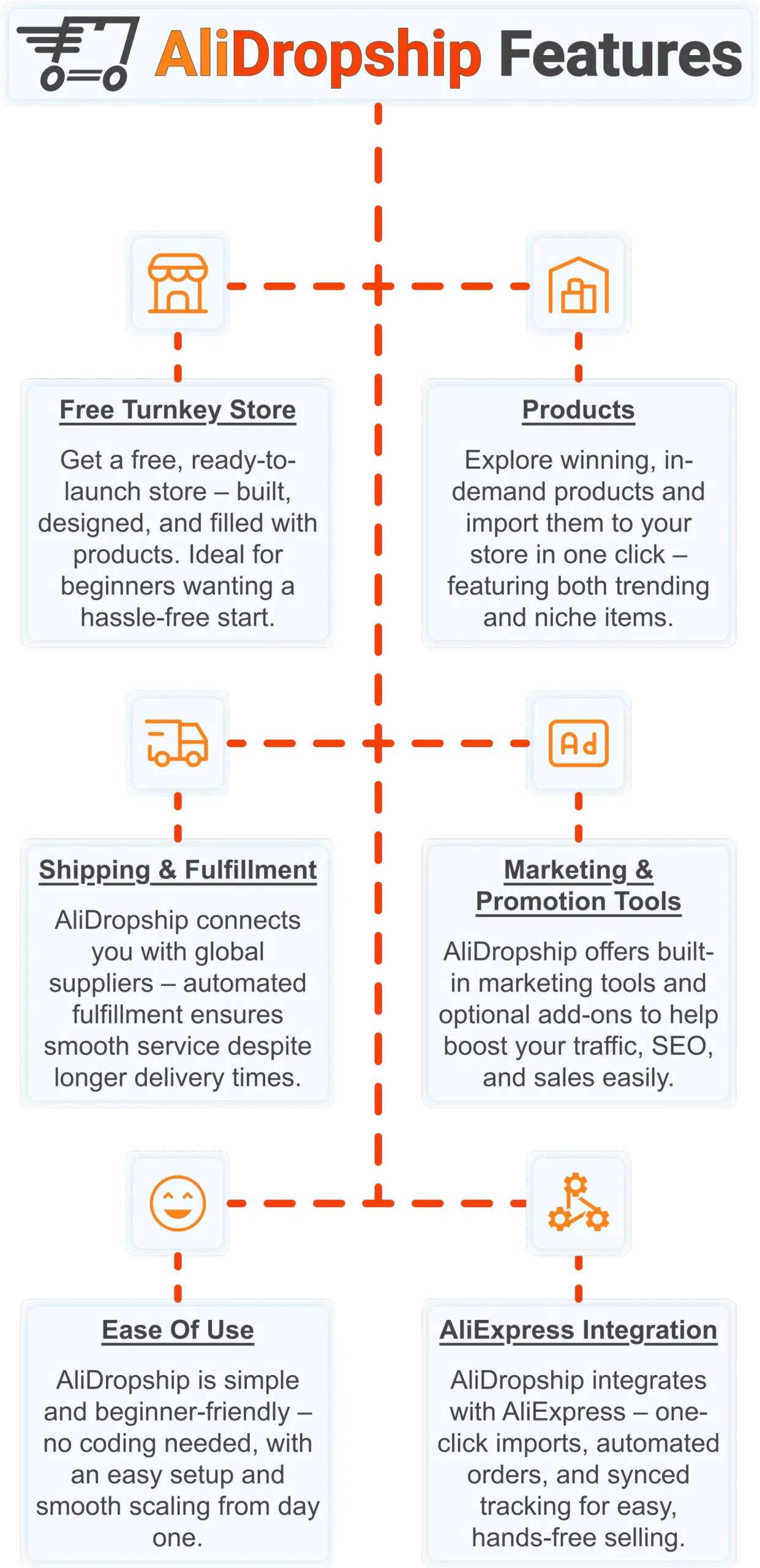
Free turnkey store ️
Get a free turnkey store – built, designed, and filled with products. Ideal for beginners wanting a hassle-free start, the store comes fully optimized to attract customers right away, saving you time on setup. Plus, it includes professional design elements to give your business a polished, trustworthy look from day one. This ready-made foundation makes it easy to move seamlessly into product selection.
Products
Once your store is set up, you can explore winning, in-demand products and import them in one click – featuring both trending and niche items. This wide selection lets you cater to diverse customer interests and test what works best. Regular updates ensure you always have fresh products, keeping your store competitive and relevant. With great products in place, smooth shipping becomes the next essential step.
Shipping & fulfillment
AliDropship connects you with global suppliers, and automated fulfillment ensures seamless order processing despite international delivery times. Customers receive real-time tracking updates, which builds confidence and trust in your store. Once shipping is handled reliably, you can focus on promoting your store and attracting traffic.
Marketing & promotion tools
To maximize sales, AliDropship offers built-in marketing tools and optional add-ons that help boost traffic, SEO, and conversions. From email campaigns and discounts to social media integration, these tools empower you to reach and retain customers without needing prior marketing experience. With promotion strategies in place, managing your business becomes simpler and more efficient.
Ease of use
AliDropship is beginner-friendly – no coding needed, with an intuitive dashboard that guides you through every step. Easy setup and smooth scaling let you expand your store without stress. As your business grows, adding new features, products, and marketing campaigns remains hassle-free, giving you more time to focus on sales.
AliExpress integration
Finally, AliDropship integrates seamlessly with AliExpress, enabling one-click imports, automated orders, and synced tracking. Your inventory stays up-to-date with the latest products and prices, while automated order processing frees you from manual tasks. Combined with the turnkey setup, reliable shipping, and built-in marketing tools, this integration ensures your dropshipping business is fully equipped for growth and success.
Now that you know how to use ChatGPT to work smarter, the next step is building a business that puts those skills to work. Get your free AliDropship store and $100 gift voucher to start your dropshipping journey today.
 Previous post
